Here's an overview of articles I put online the past weeks:
Use an ultrasonic cleaner to clean plastic and metal parts. I bought an ultrasonic cleaner a while ago. Now finally used it to shop a pinball machine and I'm amazed how clean parts come out! This is by far the best tool to buy (it's more useful than a tumbler) when you're cleaning pinball parts. Almost every part comes out sparkling, shining and looking brand new!
Golden Years show in Wieze
It had been a few years since we had visited this show. As it's in 2011 the only show in Belgium we visited again.
Add a real knocker coil to Cactus Canyon. To save costs, CC doesn't have a real knocker installed but the knocker sound is played through the speakers. It's easy to wire up a real coil.
Update to the hidden artwork on playfields.
What to do when you get the Factory Settings Restored error message on your pinball machine.
Repair damage caused by leaked batteries.
How to level a pinball machine and adjust the playfield angle.
More information and history of the Capcom Big Bang Bar pinball machine and its reproduction.
Thursday, April 28, 2011


pinrepair has been replaced by pinwiki.com
Most people will probably have already heard it, if not they've probably noticed it by now: most of the game-specific repair guides that were at www.pinrepair.com are gone.
A new site has been launched to replace its role: www.pinwiki.com
Feel free to contribute to articles if you have specific information to contribute..
I intend to finish some technical/basics articles that I started a while ago for my site. Up to now I focused on the basic things and never wrote anything more technical/documenting specific repairs and troubleshooting, as everything you had to know was available on pinrepair. That will change now.
I'll also document more repairs I do to my own games - sort of like the pinballninja blog was, as that blog is also gone.
Just don't expect me to document 500 repairs a year.. :-)
Readers of this blog that do interesting repairs may also submit them to me so I can add them..
A new site has been launched to replace its role: www.pinwiki.com
Feel free to contribute to articles if you have specific information to contribute..
I intend to finish some technical/basics articles that I started a while ago for my site. Up to now I focused on the basic things and never wrote anything more technical/documenting specific repairs and troubleshooting, as everything you had to know was available on pinrepair. That will change now.
I'll also document more repairs I do to my own games - sort of like the pinballninja blog was, as that blog is also gone.
Just don't expect me to document 500 repairs a year.. :-)
Readers of this blog that do interesting repairs may also submit them to me so I can add them..
Wednesday, April 27, 2011
Tron is confirmed as next Stern
It seems Tron is confirmed as the next Stern pinball machine, from what a Canadian distributor has posted. It should go for sale in May.
Our TRON pinball puts the players in the middle of TRON movie and
video game action battles. This is a fast moving game. TRON has 3
flippers, including an upper flipper to shot one of the two fabulous
fast action ramps. We have not utilized a 3rd flipper in a while, and
players will enjoy it. In the center of the playfield, near the top,
there is a motorized 3 bank target assembly the player must hit and
lower, to gain access to the illuminated, motorized spinning disc,
representing TRON's Identity Disc. The spinning disc shoots the ball
randomly across and around the playfield. Ramp shots take the player
to an exciting Light Cycle multiball. The player shoots at the
miniature TRON video game to start exciting features and collect big
points.
Our TRON pinball puts the players in the middle of TRON movie and
video game action battles. This is a fast moving game. TRON has 3
flippers, including an upper flipper to shot one of the two fabulous
fast action ramps. We have not utilized a 3rd flipper in a while, and
players will enjoy it. In the center of the playfield, near the top,
there is a motorized 3 bank target assembly the player must hit and
lower, to gain access to the illuminated, motorized spinning disc,
representing TRON's Identity Disc. The spinning disc shoots the ball
randomly across and around the playfield. Ramp shots take the player
to an exciting Light Cycle multiball. The player shoots at the
miniature TRON video game to start exciting features and collect big
points.
Monday, April 25, 2011
stuck pinball

Got a friend over last week, he was playing on Cactus Canyon.
Suddenly the pinball got stuck, in quite an original place.
The pinball bounced off the Bart hat and got stuck behind the flasher on top of the lost mine. We had to remove the glass to remove it.
Luckily the lost mine plastic wasn't installed because it may not have survived this..
Yesterday I had a similar experience. My new boulder plastic was installed. The pinball rolled over one of the droptargets, just as it went up. The pinball was catapulted into the air and slammed hard into the mountain plastic. Luckily it survived well :-)
Thursday, April 21, 2011
Funhouse repair
Fixed my Funhouse a few weeks ago already, only now have time to move pictures from the camera I keep in the gameroom and blog about this repair.
When I bought this Funhouse pinball machine it didn't work completely, Rudys mouth didn't stay open.
The mouth would open and close correctly during gameplay, as Rudy speaks to you when playing a game. But when you're in multiball then the mouth would not stay open. You couldn't lock your 3rd ball to start multiball. And there's no fun in the Funhouse if you can't start multiball !
I noticed a few teeth of the gear were stripped. When I bought the machine I thought this was the cause of the problem - the stripped teeth made the mouth close again. Replaced it with a new gear I had around.
To my amazement this did not solve the problem. When you lock 3 pinballs, Rudys mouth still closes again.
Did the selftests but didn't immediately notice anything wrong. During selftest the mouth opens and closes correct ?
Started to think about it (and thanks to a reply on RGP) it finally hit me - there's also a small pcb underneath the playfield which is involved in controlling the motor and its direction. That had to be the culprit.
Took out the pcb, measured every component, transistor, and all looked ok.
There was however a jumper wire connected on the input pins which shouldn't be there.
2 pins were jumpered together ? According to the schematics these were individual input pins.
Removed this extra wire. This was probably the source of my problem and why the gear had stripped - because of it the motor always ran in one direction ?
Put the pcb back in, suddenly it didn't work at all anymore. The mouth stayed closed.
What could it be ? I knew it was working before so the pcb should be ok.
Looked again at the pcb. Tested parts.. spent too much time measuring every transistor and resistor on it again. Looking to the solder side of the pcb it was obvious repairs had been done to it and a few components had been changed - but as far as I could measure these were now working well.
Checked the schematics, thought about this extra wire.. suddenly I noticed on the connector that went to the pcb, there was a wire missing !
You can see it in the below picture: at the very left side, one blue wire is bent backwards and it's end is nicely tucked away with some electric tape:

I attached the wire again to the connector and now Rudy works completely like he has to !
In the photo it's easy to spot, but that's because the pcb is hanging loose.
Normally it's attached in the very back at the bottom of the playfield. Because the playfield only rotates up (and doesn't slide forward like on more recent WPC machines) you really have to bend inside the cabinet to see it, and this wires are half hidden by other wires and parts at the bottom of the playfield..
The weird thing is I don't understand the history of this repair.
I can only think that several repair persons worked on this, one more skilled than the other.
Maybe first the transistor or something else failed on the pcb which made the mouth run all the time or only in 1 direction.
To solve this (maybe a quick fix on location ?) the blue wire controlling this was removed from the connector.
Later another tech who's more skilled worked on this game ? (or the same one, but he had forgotten what he had done before ?) He takes out the pcb, repairs the broken components, installs it and it doesn't work. He misses the removed wire because it's well hidden underneath the playfield, but does notice he needs some input to the board on that pin. So he attaches a jumper wire from one pin to the other.
Does selftests, mouth opens and closes correctly, problem solved.
(Except for when you want to start multiball, the mouth doesn't stay open, which is something you don't immediately notice)
The weird thing is the person I bought this game from had it over a year. As far as I know no tech worked on it in his house. This means all this time he never had a completely working game and could never start multiball ?? Unless by accident - if are lucky you can shoot a ball in Rudys mouth just when he is talking.
Never had such a weird fix. The board was already repaired, just 1 wire needed to be connected again. Easy for me (although I wasted too much time until I noticed it).
but at least I can enjoy Funhouse like it is meant !
(fixing the plungers for the eyes is something I'll to later when I have time to shop the game completely).
When I bought this Funhouse pinball machine it didn't work completely, Rudys mouth didn't stay open.
The mouth would open and close correctly during gameplay, as Rudy speaks to you when playing a game. But when you're in multiball then the mouth would not stay open. You couldn't lock your 3rd ball to start multiball. And there's no fun in the Funhouse if you can't start multiball !
I noticed a few teeth of the gear were stripped. When I bought the machine I thought this was the cause of the problem - the stripped teeth made the mouth close again. Replaced it with a new gear I had around.
To my amazement this did not solve the problem. When you lock 3 pinballs, Rudys mouth still closes again.
Did the selftests but didn't immediately notice anything wrong. During selftest the mouth opens and closes correct ?
Started to think about it (and thanks to a reply on RGP) it finally hit me - there's also a small pcb underneath the playfield which is involved in controlling the motor and its direction. That had to be the culprit.
Took out the pcb, measured every component, transistor, and all looked ok.
There was however a jumper wire connected on the input pins which shouldn't be there.
2 pins were jumpered together ? According to the schematics these were individual input pins.
Removed this extra wire. This was probably the source of my problem and why the gear had stripped - because of it the motor always ran in one direction ?
Put the pcb back in, suddenly it didn't work at all anymore. The mouth stayed closed.
What could it be ? I knew it was working before so the pcb should be ok.
Looked again at the pcb. Tested parts.. spent too much time measuring every transistor and resistor on it again. Looking to the solder side of the pcb it was obvious repairs had been done to it and a few components had been changed - but as far as I could measure these were now working well.
Checked the schematics, thought about this extra wire.. suddenly I noticed on the connector that went to the pcb, there was a wire missing !
You can see it in the below picture: at the very left side, one blue wire is bent backwards and it's end is nicely tucked away with some electric tape:
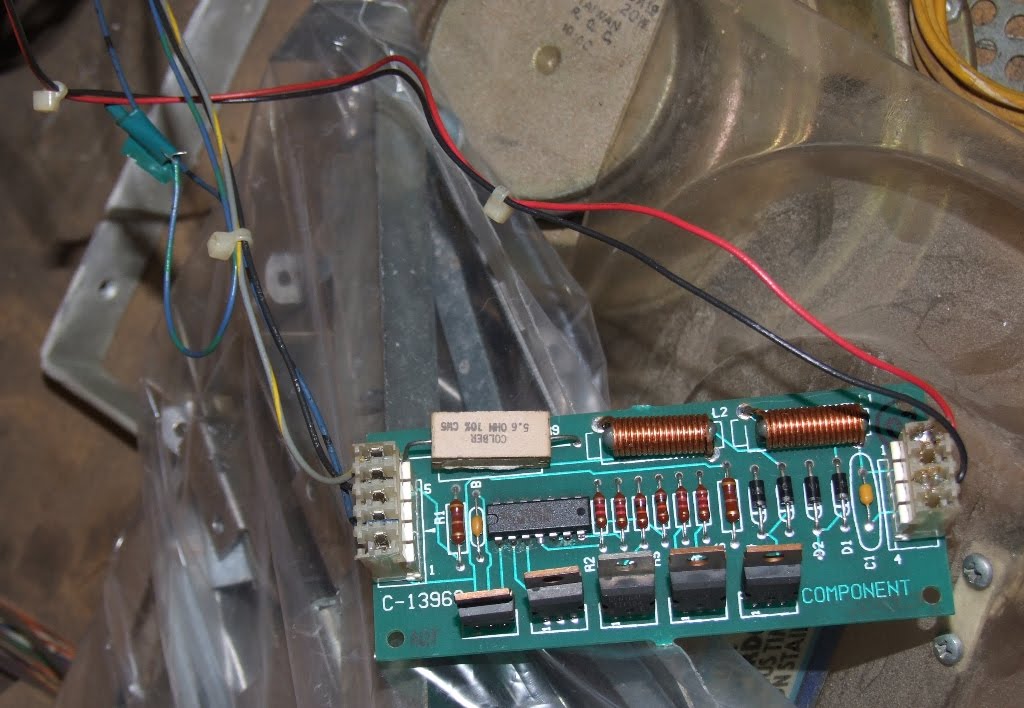
I attached the wire again to the connector and now Rudy works completely like he has to !
In the photo it's easy to spot, but that's because the pcb is hanging loose.
Normally it's attached in the very back at the bottom of the playfield. Because the playfield only rotates up (and doesn't slide forward like on more recent WPC machines) you really have to bend inside the cabinet to see it, and this wires are half hidden by other wires and parts at the bottom of the playfield..
The weird thing is I don't understand the history of this repair.
I can only think that several repair persons worked on this, one more skilled than the other.
Maybe first the transistor or something else failed on the pcb which made the mouth run all the time or only in 1 direction.
To solve this (maybe a quick fix on location ?) the blue wire controlling this was removed from the connector.
Later another tech who's more skilled worked on this game ? (or the same one, but he had forgotten what he had done before ?) He takes out the pcb, repairs the broken components, installs it and it doesn't work. He misses the removed wire because it's well hidden underneath the playfield, but does notice he needs some input to the board on that pin. So he attaches a jumper wire from one pin to the other.
Does selftests, mouth opens and closes correctly, problem solved.
(Except for when you want to start multiball, the mouth doesn't stay open, which is something you don't immediately notice)
The weird thing is the person I bought this game from had it over a year. As far as I know no tech worked on it in his house. This means all this time he never had a completely working game and could never start multiball ?? Unless by accident - if are lucky you can shoot a ball in Rudys mouth just when he is talking.
Never had such a weird fix. The board was already repaired, just 1 wire needed to be connected again. Easy for me (although I wasted too much time until I noticed it).
but at least I can enjoy Funhouse like it is meant !
(fixing the plungers for the eyes is something I'll to later when I have time to shop the game completely).
Subscribe to:
Posts (Atom)